Overview
Wholegood managed its work in ClickUp, its schedule in Google Calendar, and its invoices in Stripe. Tim still had to connect the steps himself.
Planning the week meant finding upcoming tasks and creating calendar events. Billing involved reviewing completed work, preparing invoice details, and checking payment status afterward. The information was available, but using it across different tools required repeated manual work.
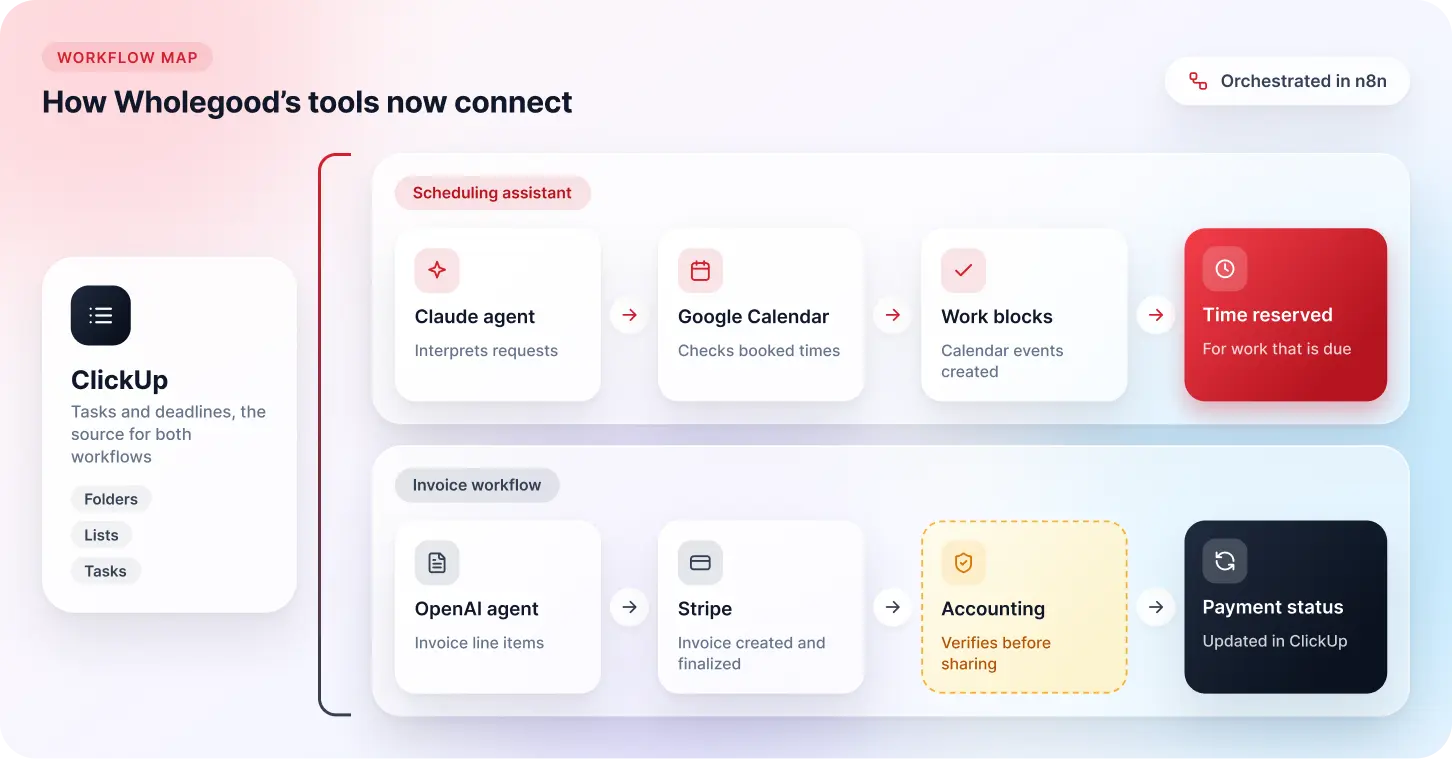
Red Star Technologies built two n8n workflows: an AI scheduling assistant and an invoice preparation workflow. Both are operating in Wholegood’s environment, connecting task information with calendar bookings, accounting review, and payment tracking.
Initial Challenge
1. Finding Time for Work Already Recorded in ClickUp
Due dates were spread across several ClickUp folders and lists. Tim had to review those lists, check his calendar, and create events individually.
When planning slipped during a busy week, deadlines could approach without time reserved to complete the work.
2. Preparing Invoices from Task Records
Billing required another pass through ClickUp to identify relevant work and organize it into invoice line items.
Descriptions, quantities, and amounts then had to be entered into Stripe. This duplicated information-handling work and created opportunities for missed details or copying errors.
3. Keeping Payment Information Current
Payments were recorded in Stripe, while project activity remained in ClickUp.
Updating the workspace required someone to check the invoice and copy its status across. Reviewing a task alone did not necessarily reveal whether the associated invoice had been paid.
Background
Wholegood is a small business led by Tim, whose responsibilities include client delivery, project coordination, and billing.
We began by mapping his routine and identifying where information had to be transferred manually. ClickUp remained the main workspace for tasks and deadlines. Google Calendar supplied availability, and Stripe handled invoices and payments.
The design used AI for interpreting requests and task descriptions, with code handling defined filtering and formatting steps. Invoice preparation also retained a human checkpoint: the accounting team verifies invoices before sharing them with customers.
Solution Design and Implementation
1. Built a Conversational Scheduling Assistant
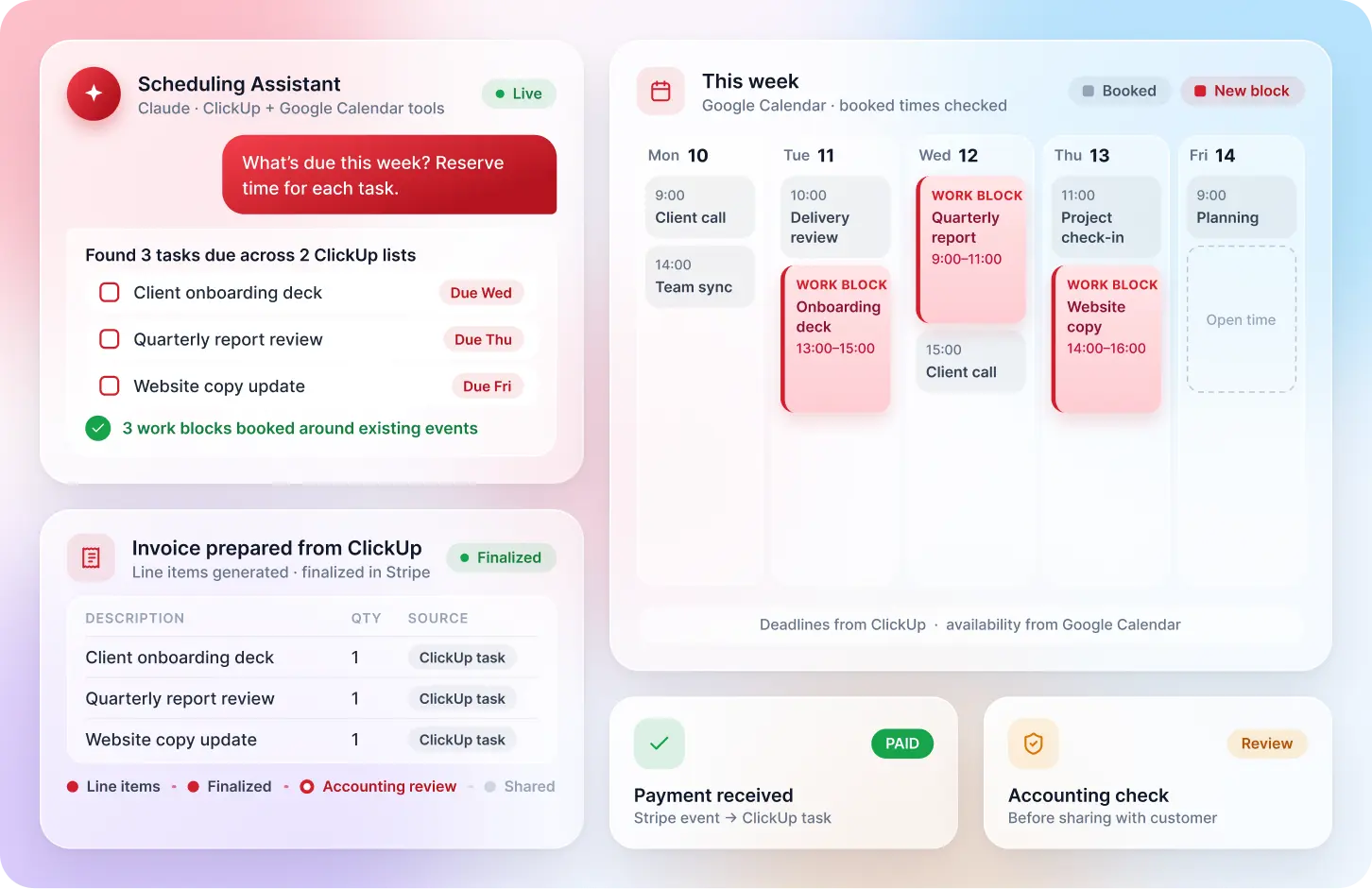
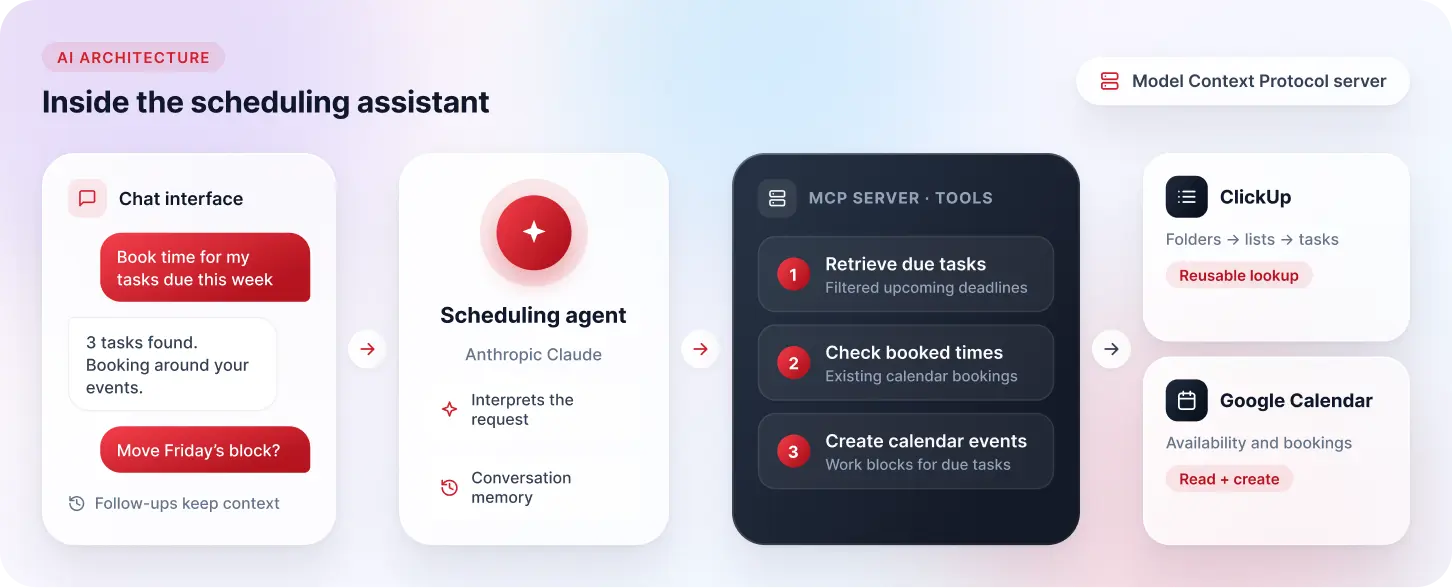
We created a chat interface where Tim can request upcoming tasks and ask the assistant to reserve time for them.
An agent using Anthropic Claude interprets the request and selects the appropriate tools. Conversation memory maintains context for follow-up questions within the interaction.
The assistant can retrieve due tasks, check existing calendar bookings, and create Google Calendar events.
2. Connected Task Deadlines with Calendar Availability
A reusable workflow retrieves ClickUp folders, lists, and tasks. It filters the results for relevant upcoming deadlines and prepares a summary for the scheduling agent.
The agent checks booked times in Google Calendar before creating work blocks. This brings the task deadline and existing commitments into the same planning process.
The tools are exposed through a Model Context Protocol server, keeping their functions separate from the agent’s conversational instructions.
3. Automated Invoice Preparation with Accounting Review
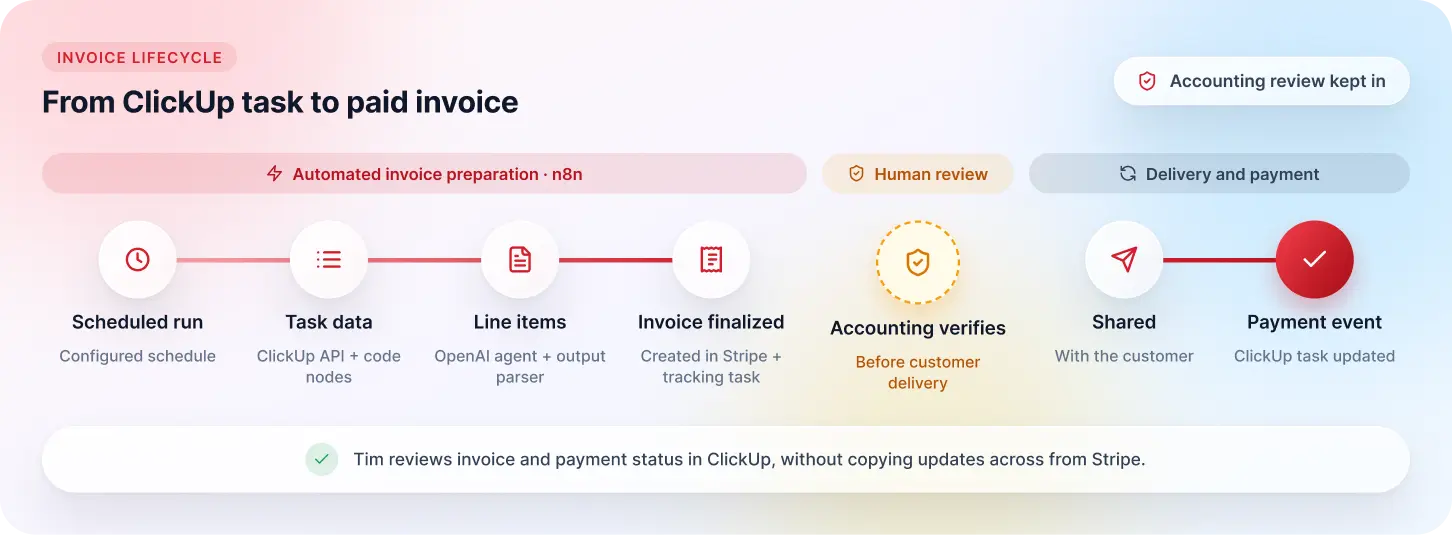
The billing workflow runs on a configured schedule and retrieves relevant task information through the ClickUp API.
Code nodes prepare the data, and an OpenAI agent converts it into invoice line items. A structured output parser organizes the response into the format used by the subsequent workflow steps.
The workflow creates the invoice in Stripe, adds the line items, and finalizes it. The prepared invoice then goes to Wholegood’s accounting team for verification before being shared with the customer.
This preserves review of the billing details before customer delivery.
4. Linked Invoice Tracking with Payment Events
The workflow creates a tracking task in ClickUp so the invoice is visible within Wholegood’s project workspace.
A separate Stripe-triggered workflow listens for payment events and updates the matching task. Tim can therefore review the payment status in ClickUp without manually transferring that update from Stripe.
The ClickUp task lookup was also built as a reusable component, allowing the same retrieval process to support additional workflows.
The Results
Wholegood now has working connections between task planning, invoice preparation, and payment tracking.
| Area | Before | After Implementation |
|---|---|---|
| Upcoming work | Review several ClickUp lists manually | Retrieve relevant due tasks through the assistant |
| Calendar planning | Check availability and create events individually | Check booked times and create work blocks within the scheduling workflow |
| Invoice preparation | Transfer task details into Stripe line by line | Generate structured line items and create and finalize invoices |
| Accounting review | Manually prepare billing information for verification | Accounting verifies the prepared invoice before customer delivery |
| Invoice visibility | Review billing separately from project activity | Track invoices through corresponding ClickUp tasks |
| Payment updates | Check Stripe and update ClickUp manually | Update the matching task following a Stripe payment event |
Tim can now start planning through a conversation, while the billing workflow prepares invoices from task information already held in ClickUp. Accounting verification remains part of the process.
Lessons Learned
- Use calendar availability alongside task deadlines: Knowing what is due does not establish when there is time to complete it.
- Keep financial verification explicit: Preparing structured invoice data supports processing, while accounting checks the billing details.
- Separate language interpretation from fixed operations: AI handles requests and descriptions; code handles filtering and formatting.
- Build shared components for repeated tasks: A reusable ClickUp lookup avoids duplicating the same retrieval work across workflows.
Connect Your Scheduling and Billing Workflows
If your team repeatedly copies deadlines and billing details between applications, those handoffs are worth reviewing.
Red Star Technologies can help assess your process and develop custom workflow automation around your existing tools, scheduling requirements, and accounting review steps.
Talk to Our Team About Scheduling and Invoice AutomationTech Stack Summary
| COMPONENT | TECHNOLOGY |
|---|---|
| Workflow orchestration and scheduling | n8n |
| Task information and invoice tracking | ClickUp |
| Availability checks and calendar bookings | Google Calendar |
| Invoice creation and payment events | Stripe |
| Conversational scheduling agent | Anthropic Claude |
| Invoice line-item generation | OpenAI |
| Agent tool interface | Model Context Protocol |
| Data filtering and transformation | JavaScript code nodes |
| Invoice output formatting | Structured Output Parser |
Conclusion
Wholegood’s implementation connects the administrative steps surrounding client work. Tim can request calendar bookings through the assistant, accounting receives prepared invoices for verification, and payment events update the related ClickUp records.