Introduction
ClickUp is a powerful suite of productivity and collaboration tools. You'll be able to streamline your tasks and projects with it. It enhances your team's efficiency and achieves remarkable results with its user-friendly interface, robust features, and customizability options. With ClickUp’s digital workspace, you can manage projects seamlessly, simplify communication, and explore possibilities.
Red Star Technologies can help you structure, configure, and automate your ClickUp workspaces, dashboards, and custom team workflows.
Description
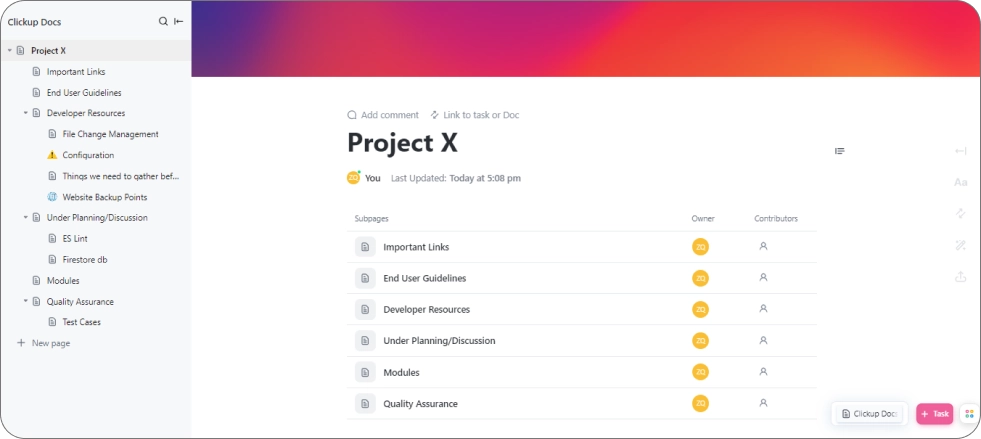
ClickUp Doc is helpful while creating Documents
For any project, we create a separate workspace having pages and sub-pages relevant and necessary for that project. Below is the flow for creating a folder structure approach in ClickUp Docs.
First, create a top-level folder for a project (e.g. Project X )
-
Project X
- Important Links
Contains important links related to the project, such as project management tools, external resources, or reference websites.
- End-User Guidelines
Providing clear guidelines files for end-users is essential for a successful project.
- Developer Resources
For the development of projects, a centralized resource document is created so developers can improve their efficiency
- Under Planning/Discussion
All the documents or files related to the features that we are planning to develop in future come under this category.
-ES Lint
-Fire Store db
- Modules
Developed features of a project lie in this folder.
- Quality Assurance
Maintain a document dedicated to quality assurance processes and test plans. Contains all the test cases written for the developed features. -Test Cases
- Important Links
So, this approach helps us to organize and search files on ClickUp Docs easily and efficiently.
By offering these services using ClickUp Docs, we can enhance client satisfaction, improve project efficiency, and provide a valuable resource for collaboration and knowledge management. This not only benefits our clients but also strengthens our service offerings and client relationships.
Need Custom ClickUp Automation & Integration?
From workspace hierarchy and custom dashboards to automated ticket templates and app integrations, our ClickUp experts help your team work faster and smarter.
- ClickUp Workspaces
- Workflow Automations
- Custom Dashboards
- App Integrations
- Ticket Templates
- Your team's current ClickUp setup & bottlenecks
- Recommended workspace structure & hierarchy
- Custom automation rules & tool integrations
- ClickUp onboarding & implementation timeline